Self-improve · the learning loop
An agent that learns from you, with a paper trail.
Most tools either forget everything or silently accumulate behaviour you never signed off on. AEGIS does neither. It reviews its own sessions and proposes learnings — and every proposal waits for your explicit approval. Learned skills are written through a kernel-gated intent like any other action, and the journal records the lot.
The loop is a product in its own right — deep dive at selfimprove.consultancyinaction.tech. Also see the audit commands.
The loop
Review → propose → you decide → curate.
01
Review
At the end of a session — or on demand — the loop looks for three signals: you corrected the agent, a non-trivial technique emerged, or an existing instruction proved wrong.
02
Propose
Findings become drafts in a proposals area — named for the class of task, never today's specific bug. Nothing goes live.
03
You decide
Approve promotes a proposal into the live library; reject archives it. Consent-first is the default mode, and pause kills the whole loop with one command.
04
Curate
A weekly pass consolidates duplicates and retires stale skills so the library stays sharp instead of sprawling. Every move is journalled.
The AEGIS command surface
Interactive or headless — same loop, same journal.
In the TUI, type /self-improve mid-session. Headless — for scripts and
schedulers — every action is ciarustcode learn <action>:
-
$ ciarustcode learn review
Review the session (or a saved transcript with --transcript) for corrections, preferences and reusable techniques, and write proposals — never live skills.
-
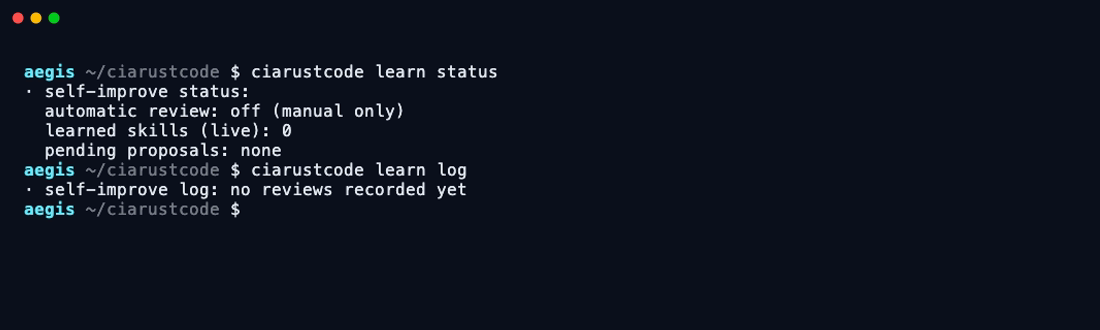
$ ciarustcode learn status
The dashboard: is automatic review on, how many learned skills are live, what proposals are pending your decision.
-
$ ciarustcode learn approve <name>
Promote a proposal into the live skill library. Approval is explicit and per-skill — nothing self-activates.
-
$ ciarustcode learn reject <name>
Decline a proposal. Rejected proposals are archived, never deleted — the decision itself is part of the record.
-
$ ciarustcode learn curate
Consolidate the library: merge duplicates, retire stale entries. Designed as the target for a weekly scheduled job.
-
$ ciarustcode learn log
The journal: every review that ran, what it saved or proposed, and when. The learning loop's own audit trail.
-
$ ciarustcode learn pause / resume
One command freezes all learning instantly; one brings it back. Pause always wins over any schedule.
Built to be scheduled
learn curate is designed as a weekly cron/launchd job. Skills the agent proposes
are written via a kernel-gated write_skill intent — scope-checked, ledgered and
revocable, exactly like every other action.
$ ciarustcode learn curate
# write_skill intent — scope-checked, ledgered, revocable.
Why this is a safety feature
Learning is governed like every other action.
Learning is an intent
A learned skill changes future behaviour — so writing one goes through the same broker as a file edit: classified, consented, written to the ledger. No silent self-modification.
Rejected ≠ deleted
Declined proposals are archived with a date, and protected skills can never be touched by the loop at all. You can always reconstruct what the agent wanted to learn and what you said no to.
Pausable, provably
learn pause stops every automatic review instantly; the journal shows the gap. Corrigibility isn't just for the coding loop — the learning loop obeys the same master.
Take the loop to any agent
The methodology is plain markdown — it travels.
We run the same loop across our whole toolchain — AEGIS, Claude Code, Codex, Hermes — because the methodology is agent-neutral text, not product code. Only the storage paths differ. The downloadable file includes the full adapter table; the pocket version fits in one paste:
Review our conversation and persist two kinds of learning. (1) MEMORY — facts about me, my preferences, my environment. (2) PROCEDURES — how to do a class of task well for me. Act on: corrections you received; non-trivial techniques that emerged; instructions that proved wrong. Prefer patching existing entries over creating new ones; name procedures for the CLASS of task, never today's bug. Never record transient errors — record the FIX. Save to [your agent's memory location]. Finish with one line: what you saved, or "Nothing to save" and why.
That single paragraph is most of the value. The rest — proposals, approval gates, curation, journalling — is what makes it safe to automate, and that's what AEGIS ships natively.
Share the loop.
One markdown file: the full command surface, the methodology, the pocket prompt and the adapter pattern for other agents. No sign-up, no wall — take it.